Before You Paste: The One Rule That Makes Every Other AI Workflow Safe
Most HR teams get the data question backwards. Here is the version that protects your people.

The task and when to reach for this
Every other issue in this series asks you to put HR material into Claude: a policy, a set of review notes, survey comments, a comp file. That is where the real risk lives, not in the prompt. Before any of it, you need one rule and a thirty-second habit. This issue is the seatbelt. Read it once, build the habit, and every workflow after it is safe by default. Skip it, and you are one careless paste away from putting employee data somewhere it should never be.
The core rule
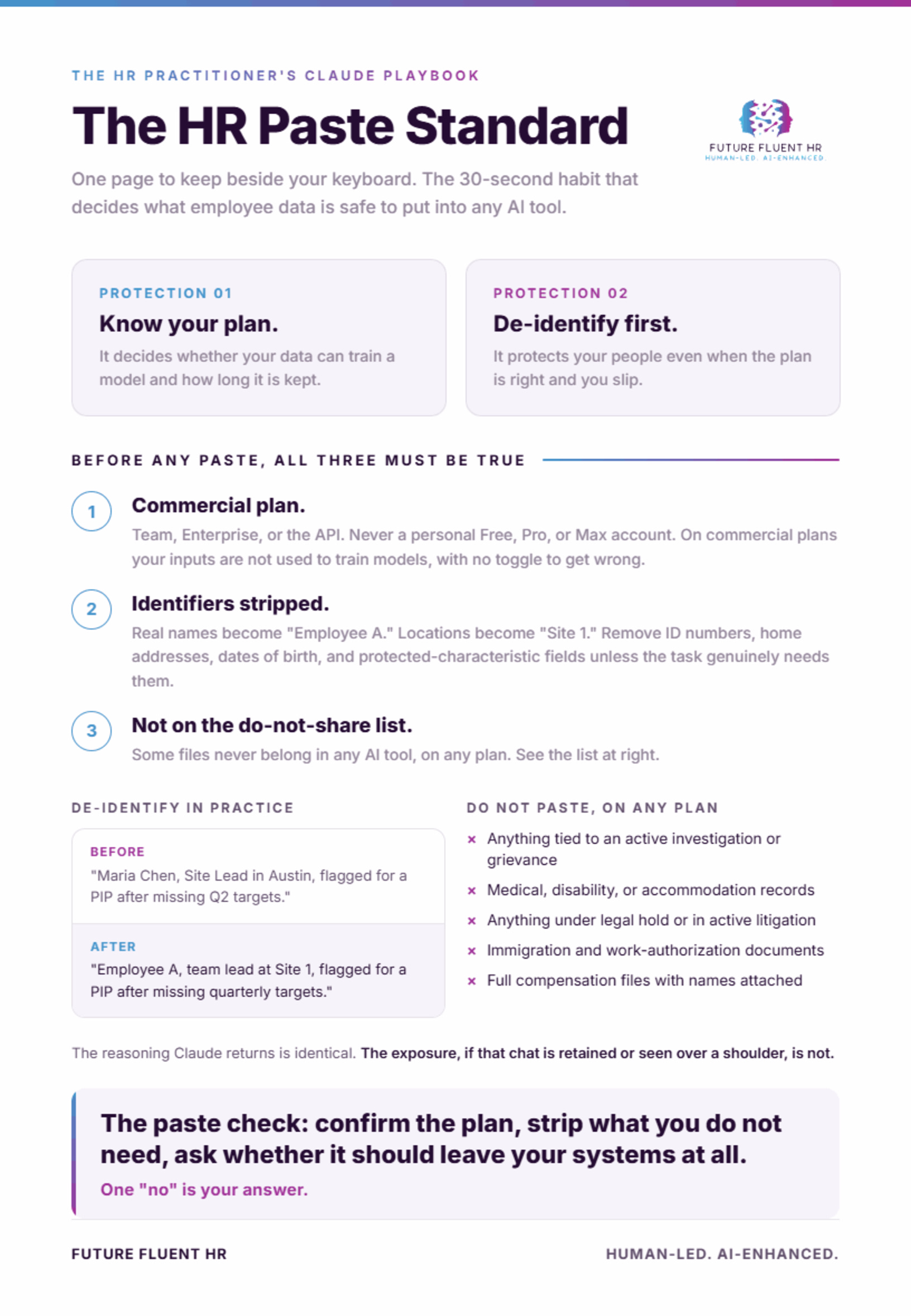
Know which plan you are on, and de-identify before you paste. Those are two separate protections, and you want both. The plan determines whether your data can be used to train a model and how long it is kept. De-identification protects your people even when the plan is right and even when you make a mistake.
The facts you need
Anthropic runs two different sets of terms, and the difference matters more than any prompt you will ever write.
On the consumer plans, which are Free, Pro, and Max, model training is now a setting you choose. If that setting is on, or if you clicked through the prompt without reading it, your chats can be retained for up to five years and used to help train future models. If you opted out, retention drops to thirty days and your chats are not used for training. Most people do not remember which they picked. Go check yours right now: Settings, then Privacy, then the toggle labeled “Help improve Claude.” Deleting a conversation also removes it from future training.
On the commercial plans, which are Claude for Work (Team and Enterprise), the API, Claude for Education, and Claude Gov, your inputs are not used to train models. That is the default under the Commercial Terms, with no toggle to get wrong. This is the side of the line HR work belongs on. If your organization is running employee data through a personal Pro account, that is the first thing to fix.
Two more details keep you from over-trusting a label. Zero Data Retention is a stronger, separate arrangement, but it is an approval-based contract for eligible API and enterprise use, not a switch you flip in the app, and even under it Anthropic still keeps safety classifier results. And HIPAA-eligible use requires a Business Associate Agreement, which Anthropic offers only on its API and HIPAA-ready Enterprise plans, not on consumer, Team, or Cowork accounts. None of that replaces the habit below; it sits underneath it.
What good practice looks like
A thirty-second pre-paste check, every time, until it is automatic:
First, confirm the plan. Employee or pay data goes into a Team or Enterprise workspace, not a personal account. If you are not sure which you are in, stop and find out.
Second, strip the identifiers you do not need. Names become “Employee A.” Specific locations become “Site 1.” Drop anything you would not want reconstructed: ID numbers, dates of birth, home addresses, protected-characteristic fields. Claude does not need real names to theme survey comments or draft a review. It needs the substance.
Third, ask whether this data even should leave your systems. Some files (active investigations, medical, legal hold) do not belong in any AI tool, on any plan. The right answer is sometimes “not this one.”
If you can paste on a commercial plan, with identifiers stripped, and the data is not in a do-not-share category, you are clear. If any of the three fails, you have your answer.
The trap to avoid
The trap is believing “Claude does not train on my data” without checking which plan that promise applies to. That protection holds by default on commercial plans. On consumer plans it came down to a setting you had to choose, and a lot of HR people accepted it by clicking “accept” on a pop-up during a busy week. A free or Pro account with training left on, holding a pasted spreadsheet of names, salaries, and performance ratings, retained for five years, is the exact scenario this issue exists to prevent.
The second trap is treating the plan as the whole job. Even on a perfect enterprise setup, pasting more identifiable data than the task requires is a needless exposure. Plan protects you from the vendor. De-identification protects your people from everyone, including a misdirected copy-paste or a screen-share. Do both.
And the standard one: where data carries legal, medical, or investigatory weight, the decision to use any AI tool is a policy question for you and your legal or privacy partner, not a personal judgment call made at the keyboard.
The level-up move
Make the safe path the default path so no one has to remember. Get your team onto a commercial plan if you are not already. Use Projects to keep a workflow's reference documents contained instead of pasting them into open chats each time. And write your own one-page “what HR can and cannot paste” standard, the de-identification rule plus your do-not-share categories, so the habit lives in your operation instead of one person's head. That standard is the real deliverable. Every later issue in this series plugs into it.
A note on accuracy: the plan and policy specifics here reflect Anthropic's published terms as of mid-2026. AI data policies change, so verify the current terms before you rely on them, and treat the rule itself as durable even when the details shift.
This is No. 1 of The HR Practitioner's Claude Playbook, the one that makes the rest safe to use. Questions, or want the one-page paste standard as a template: info@futurefluenthr.ai.